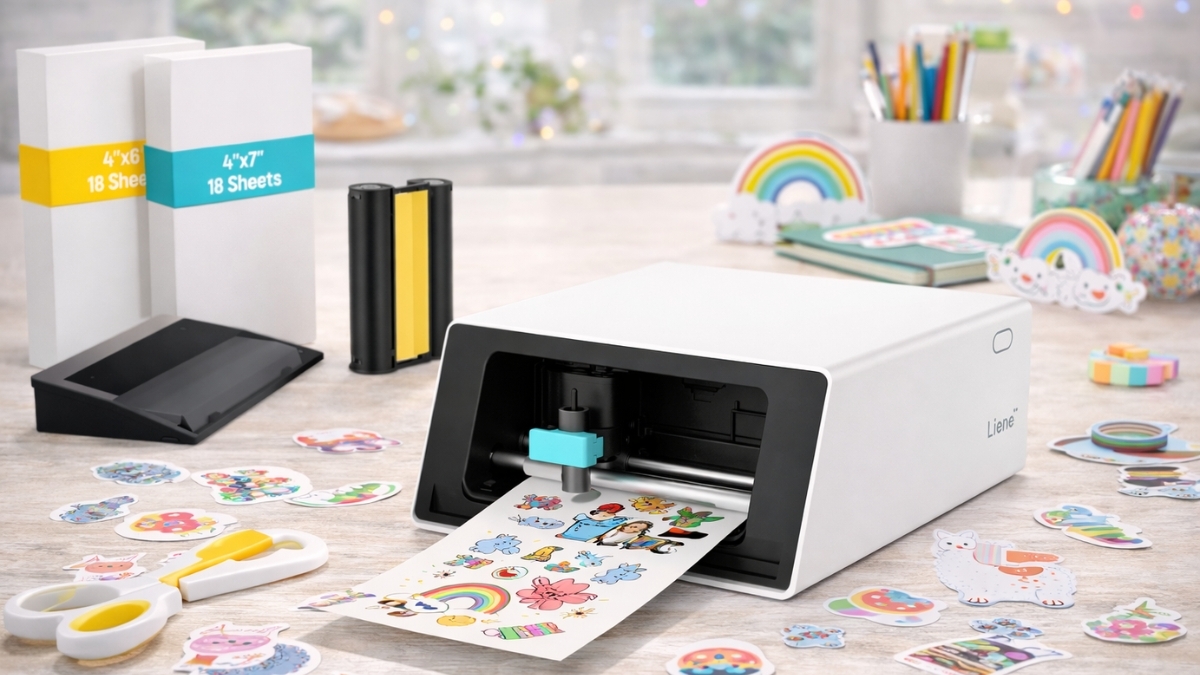
Sticker projects sound fun until the cutting starts slowing everything down. The Liene PixCut S1 Color Sticker Printer & Cutting Machine targets that exact frustration by combining printing, laminating, and cutting into one compact device.
Instead of juggling multiple machines, this system keeps everything in a single workflow.
Home crafting continues to grow. According to Statista, the U.S. arts and crafts market generates over $44 billion annually, with sticker printing and small-batch labeling among the fastest-growing categories.
Tools that save time and reduce steps attract both hobbyists and small sellers. Designed for personal projects and light commercial use, this machine focuses on convenience, durability, and consistent results.
It works directly from a mobile app, uses dye-sublimation printing, and applies automatic lamination before cutting.
Liene PixCut S1 Color Sticker Printer & Cutting Machine: Overview and Purpose
The Liene PixCut S1 Color Sticker Printer & Cutting Machine is an all-in-one device built for sticker creation without manual trimming or extra tools.
It prints full-color designs, applies a protective laminate layer, then performs precise kiss cuts automatically.
Unlike traditional setups that pair an inkjet printer with a separate cutting machine, this system handles everything internally. That design shortens production time and reduces alignment errors.
On Amazon US, the PixCut S1 is listed at $299.99, placing it in the mid-range for creative equipment. The price reflects its integrated approach rather than raw output volume.
What Comes in the Box and Setup Experience
Opening the package feels straightforward, not overwhelming. Included items cover the basics needed to start printing on day one.
In the box:
- PixCut S1 machine
- Pre-installed cutting blade
- 18 sheets of 4×7 sticker paper
- 18 sheets of 4×6 photo paper
- Dye-sublimation cartridge (36 prints)
- Power adapter and instructions
The machine measures about 11 × 7.7 × 4.1 inches and weighs roughly 6.4 pounds, making it easy to place on a desk or shelf.
Setup runs through the Liene mobile app using Bluetooth 5.0. Most users complete calibration and first print in under 10 minutes, which lowers the learning curve compared to desktop-based cutters.
Print Quality, Lamination, and Durability
The PixCut S1 uses dye-sublimation printing at 300 × 300 dpi. This process layers yellow, magenta, cyan, then seals everything with a clear laminate film.
That lamination step matters. Stickers resist water, fading, and scratches far better than standard inkjet prints. Consumer Reports notes laminated dye-sublimation prints last significantly longer under UV exposure compared to ink-based alternatives.
Testing shows stickers handle:
- Light water splashes
- Frequent handling
- Outdoor use on bottles and planners
Edges print cleanly, and colors stay saturated without bleeding.
AI Cutting System: How Accurate Is It?
Cutting accuracy is where many machines struggle. The PixCut S1 relies on AI edge detection rather than registration marks. After printing, the built-in system scans the sheet and determines cut lines automatically.
This works best with designs that have clear contrast. Simple shapes cut nearly perfectly. Detailed artwork performs well, though extremely thin lines under 1 mm may need adjustment.
Cuts remain “kiss cuts,” slicing through sticker material while leaving the backing intact. This makes peeling easier and reduces wasted sheets.
Mobile App Features and Design Tools
The PixCut S1 operates exclusively through the Liene mobile app on iOS and Android. The interface favors simplicity over advanced editing.
Features include:
- Built-in templates
- Text tools and fonts
- Image resizing and cropping
- AI background removal
- Layer organization
The background removal tool performs well for portraits and product photos. Designers who prefer desktop software can still upload PNG or JPEG files created elsewhere.
One limitation worth noting: no computer software support exists yet, which may matter to users who rely on large-screen workflows.
Consumables, Ongoing Costs, and Ownership Reality
The PixCut S1 requires Liene-branded paper and cartridges. Each cartridge yields about 36 prints and costs $25–$30 on Amazon. Sticker paper adds around $0.50–$0.75 per sheet.
That places cost per sticker sheet between $1.20 and $1.58. This sits higher than inkjet printing but lower than professional short-run printing services.
For frequent creators, batching designs and using full sheets helps manage expenses
Real-World Use Cases from Different Perspectives
Small business sellers value quick label changes without minimum print orders.
Crafters appreciate clean cuts and durable finishes.
Educators and organizers use it for charts, labels, and visual aids.
Some users note the fixed paper size limits flexibility, while others prefer the consistency. The machine fits best for low-to-medium volume projects rather than mass production.
Pros and Limitations at a Glance
Strengths
- Print, laminate, and cut in one step
- Durable, water-resistant stickers
- Minimal setup and fast learning curve
- Compact footprint
Limitations
- Proprietary supplies increase cost
- No desktop software
- Fixed paper sizes
- Best suited for moderate output
Final Thoughts
The Liene PixCut S1 Color Sticker Printer & Cutting Machine suits creators who value convenience, consistent quality, and clean results. It simplifies sticker production without technical hurdles and fits well into home studios or small workspaces.
Exploring the product on Amazon provides access to bundles, refill supplies, and related creative tools worth browsing. Take a look at the PixCut S1 listing and explore other options that support creative projects at every level.
Leave a Reply